




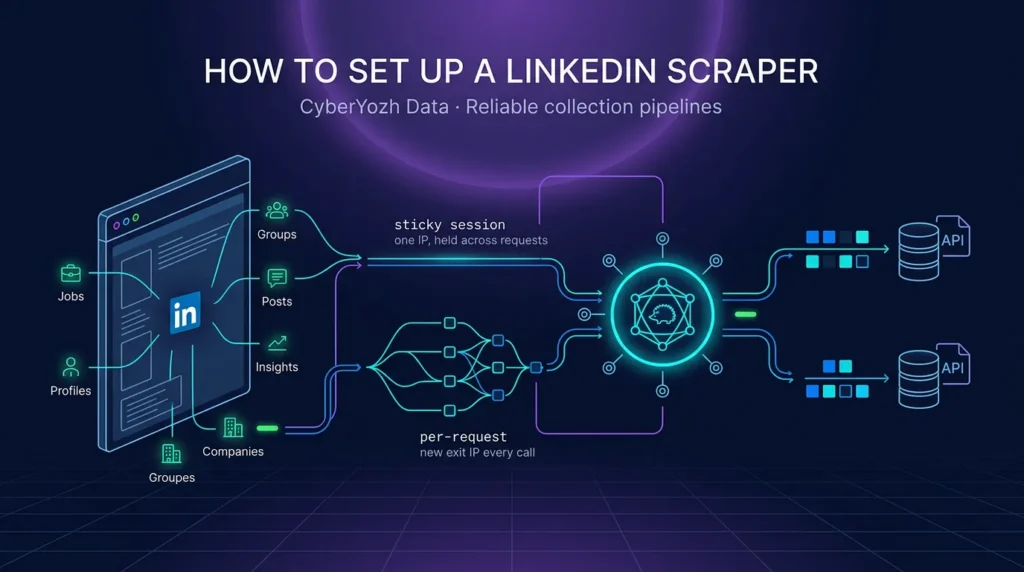
A LinkedIn scraper lets you get profiles, jobs, emails, posts, companies, and other essential business data. The platform is designed to bring business specialists together, and you may find tons of useful data here. CyberYozh infrastructure helps you get this data quickly and efficiently, so you can use it instantly in your business workflows, whether for market research or lead generation. Keep reading and learn more about setting up a LinkedIn scraper and its benefits for your work!
💼 LinkedIn proxy is a robust tool to scrape LinkedIn data, manage many accounts, automate LinkedIn posts and comments, and much more. Check it out and try it yourself.
What is a LinkedIn scraper with CyberYozh infrastructure
When you need to scrape LinkedIn for profiles or other data, rate limits and CAPTCHA challenges quickly become your main obstacles. Even if you try to answer messages too quickly, you can hit them, and scraping LinkedIn jobs, posts, and other business data blocks your workflows much faster.
To counter that, you need:
- a proxy infrastructure: mobile or residential IPs that can distribute the request load
- a geo-targeting feature to access local companies as if you were actually located in their country
- a scraping infrastructure to deploy proxies, rotate IPs, and scrape data
- a virtual number or several of them if you need to register additional accounts for your tasks
CyberYozh offers all these services and lets you check their quality before deployment.
⚡ Explore CyberYozh’s proxy ecosystem now, and see for yourself!
Get CyberYozh proxies: Mobile and residential
All CyberYozh proxies have a geo-targeting feature, so you can use them with city-level precision for local work. Let’s learn more about them.
📱 Mobile proxies are built on real SIM-based carrier connections, which gives them the highest trust score among all proxy types.
LinkedIn and other platforms treat mobile IP ranges as normal user traffic because millions of legitimate users share the same carrier ranges. This makes mobile proxies the right choice for authentication-heavy sessions, account registration, and any workflow where you need the IP to look like a genuine mobile user logging in from a phone. They are also the safest option when you scrape LinkedIn profiles that sit behind a login wall and require a verified session.
🏠 Residential proxies route your requests through real home ISP addresses sourced through an opt-in participant model.
They carry a high trust score and are well suited for ordinary account management, routine data collection, and the common pattern of assigning one stable IP to one account. If you are running a LinkedIn data scraper that logs into multiple accounts over time, residential static IPs give each account a consistent, realistic identity without the cost of mobile infrastructure.
🔄 Rotating residential proxies use a 50M+ IP pool across 195+ countries and are the primary choice for any LinkedIn scraper at scale.
Instead of binding one IP to one account, the rotating pool assigns a fresh address per request or per configurable time window, controlled directly from the CyberYozh dashboard. This distribution lets a LinkedIn web scraper pull hundreds of pages without tripping per-IP rate limits that would otherwise block a single address after a few dozen requests.
Deploy the open-source Yozh Scraper
Yozh Scraper is CyberYozh’s free, open-source Playwright-based scraping stack. You deploy it with Docker in about 15 minutes, point it at any LinkedIn page or preset, and it returns structured fields, raw HTML, or screenshots through a simple REST API or MCP endpoint, with built-in CyberYozh proxy integration.
Use virtual phone numbers for authentication
When a workflow needs additional LinkedIn accounts, CyberYozh’s virtual number service lets you receive SMS verification codes from any country. You rent a number for the duration of the task, confirm the account, and move on, without exposing your personal phone or buying physical SIMs.
How Yozh Scraper works as a LinkedIn scraper
The best way to understand something is practice. To save your time, here is a quick overview of the LinkedIn scraper’s practical implementation. Explore each specific business use case and decide which fits your goals
⚙️ Download the latest version of Yozh Scraper on GitHub.
Generate leads with a LinkedIn scraper
A LinkedIn profile scraper pulls names, job titles, company, and location from public profile pages and feeds them straight into your CRM. Sales teams use this to build targeted prospect lists for lead generation without manual copy-paste, then enrich each record before outreach.
Monitor brands and competitors to develop your content
A LinkedIn post scraper tracks competitor posts, announcement reactions, and comment threads over time. This feeds brand monitoring and SEO data workflows so you can spot which topics resonate and plan content that fills the gaps your rivals leave open.
Analyze user sentiments on different topics
Scrape LinkedIn posts and comments around a product launch or industry event, then run the text through sentiment analysis. The result is a review monitoring dataset that shows whether the conversation is positive, skeptical, or neutral, and which themes drive each reaction.
Collect data for AI agent training
Large volumes of public professional text are valuable for AI data collection and AI agents. A LinkedIn scrape can supply role descriptions, career histories, and discussion threads that you clean and label before using them to fine-tune or evaluate a model.
Recruit top talents for your business
A LinkedIn jobs scraper extracts job titles, required skills, company details, and posting dates at scale. Recruiters use this to discover potential employees and partners, map hiring demand by company, and prioritize outreach to candidates whose current roles signal they are ready to move.
Explore relevant market data by industry
A LinkedIn company scraper pulls employee counts, industries, locations, and specialties for entire sectors. Combined with a LinkedIn sales navigator scraper, this gives you market research data that shows which companies are growing, hiring, or expanding into new regions.
Set up CyberYozh scraping infrastructure for LinkedIn
Here is a quick summary of how to set up CyberYozh proxy infrastructure for the LinkedIn scraper. Here we use Yozh Scraper as the most convenient option, but you can also deploy proxies with your tool.
- Create a CyberYozh account and get an API key.
Sign up for CyberYozh, then open the API access page to generate a key. This single key authenticates proxies, the scraper, and the virtual number service. - Choose and purchase your proxy type.
In the proxy catalog, pick mobile proxies for login-heavy sessions, residential static for one-IP-per-account management, or rotating residential for bulk scraping. Use the built-in IP Checker to confirm each IP’s fraud score is below 50 before you deploy it. - Deploy Yozh Scraper locally.
Clone the repository, copy .env.example to .env, paste yourCYBERYOZH_API_KEY, and rundocker compose up --buildusing the command line (Windows PowerShell or Linux Bash). Verify the scraper on localhost:8000. - Configure the scrape request.
Call the scraper’s REST API or use a built-in LinkedIn preset, setproxy_typetores_rotatingormobile, add geo-targeting if you need a specific country, and pass asession_idif the target profile requires authentication. - Collect, export, and review.
Poll the job endpoint for results, export the structured JSON to your CRM or analytics tool, and keep a human in the loop before any outreach to verify relevance and consent.
Best practices for LinkedIn scraping
Last but not least, let’s review CyberYozh’s best practices for LinkedIn scraper usage.
- Respect LinkedIn’s terms and use public data only. Collect only publicly available information. Do not bypass login gates to access private data, and do not harvest personal data such as emails for unsolicited marketing, which is illegal under GDPR in many jurisdictions.
- Use the right proxy for the task. Mobile proxies for authentication and trust-critical sessions, residential static for stable account identities, and rotating residential for bulk scraping where you need a fresh IP per request.
- Apply smart IP rotation strategies. Rotate IPs at a realistic pace, bind sticky sessions to logical tasks, and monitor for 429 or 503 response codes that signal you should slow down immediately.
- Reduce, not eliminate, CAPTCHA exposure. Clean IPs with a low fraud score and realistic request pacing lower CAPTCHA frequency. No setup removes CAPTCHAs entirely, and any tool that promises that is overselling.
- Follow ethical web scraping rules. Check robots.txt, identify your scraper with an honest User-Agent, rate-limit to 5-10 seconds between requests, and prefer off-peak hours in the target site’s time zone.
- Check IP quality before every deployment. Run each IP through CyberYozh’s IP Checker for fraud score, blacklist hits, and ASN reputation, and rotate away from anything that looks overused or shared before it goes into production.
Conclusion
A LinkedIn scraper is a powerful business tool when it runs on the right infrastructure. CyberYozh’s mobile and residential proxies, rotating residential pool, virtual numbers, and the open-source Yozh Scraper give you a single stack for lead generation, recruiting, market research, and AI data collection. Pair that infrastructure with ethical scraping practices, and you get stable, repeatable workflows that produce data you can actually use.
Is it legal to scrape LinkedIn?
Scraping publicly available data is generally legal under HiQ Labs v. LinkedIn, but bypassing login gates, ignoring terms of service, or harvesting personal data for unsolicited marketing can violate the CFAA and GDPR. Always collect only public data and respect the platform’s rules.
What is a LinkedIn scraper?
A LinkedIn scraper is a tool that extracts public data from LinkedIn pages, including profiles, company pages, job posts, and public posts, and returns it in a structured format like JSON or CSV for business use.
What is the best LinkedIn scraper?
The best LinkedIn scraper for self-hosting is Yozh Scraper, CyberYozh’s free, open-source Playwright-based stack with built-in proxy integration. For managed runs, Apify LinkedIn scraper actors are a popular alternative, but they charge per result and do not give you control over the infrastructure.
How to scrape data from LinkedIn?
Deploy Yozh Scraper with Docker, add a CyberYozh API key, choose a proxy type, and call the scraper API with a LinkedIn URL or built-in preset. For logged-in pages, create a session with authentication cookies and pass its ID to the scrape request.
How to scrape LinkedIn profiles?
Use a LinkedIn profile scraper preset in Yozh Scraper, set the proxy to mobile or rotating residential, and pass the profile URL. The scraper returns structured fields like name, headline, experience, and skills in JSON.
Can I scrape LinkedIn posts?
Yes, a LinkedIn post scraper can extract public post text, timestamps, reaction counts, and comments from public feeds and company pages, which is useful for sentiment analysis and content research.
Is there a LinkedIn scraper API?
Yozh Scraper exposes a REST API and an MCP endpoint on localhost, so any tool, agent, or script can call it as a LinkedIn scraper API. LinkedIn’s own official API is restricted and does not give broad access to third-party profile data.
What is a LinkedIn email scraper?
An email scraper LinkedIn workflow extracts email addresses from public profiles or guesses them via pattern matching and MX validation. Harvesting emails for unsolicited marketing is illegal under GDPR in many jurisdictions, so this should only be used with a clear lawful basis.
Can I scrape LinkedIn jobs?
Yes, a LinkedIn jobs scraper pulls job titles, companies, locations, required skills, and posting dates from public job listings. This is useful for recruiting, hiring demand analysis, and market research.
What is a LinkedIn Sales Navigator scraper?
A LinkedIn Sales Navigator scraper extracts filtered lead lists and company data from Sales Navigator search results. It requires an authenticated session and is used by sales teams to export prospect lists into their CRM.
Can I scrape LinkedIn company pages?
Yes, a LinkedIn company scraper extracts employee counts, industries, locations, specialties, and about text from public company pages, which is useful for competitor research and market mapping.
Where can I find a GitHub LinkedIn scraper?
Yozh Scraper is available on GitHub as a free, open-source LinkedIn scraper with built-in CyberYozh proxy integration and MCP support for AI agents.
How do proxies help scrape LinkedIn?
Proxies distribute your requests across many IP addresses so no single IP hits LinkedIn’s rate limits. Mobile and residential proxies also make your traffic look like genuine users, which lowers CAPTCHA frequency and improves session stability.
Do I need a virtual number to scrape LinkedIn?
You only need a virtual number if your workflow requires creating or verifying additional LinkedIn accounts. For scraping public pages with Yozh Scraper and proxies, no phone verification is needed.
Can I scrape Google local results instead of LinkedIn?
Yes, you can scrape Google local results with Yozh Scraper’s Google preset to build a local business scraper or local lead scraper dataset. This is a useful alternative when you need regional business data without touching LinkedIn directly.