






TL;DR
- Instant Data Scraper is a free browser extension for extracting simple lists, tables, links, prices, and other repeated information from webpages.
- It works best for small, one-time exports that can be reviewed and cleaned manually.
- It is not a complete crawler, proxy-management system, API, scheduler, or production data pipeline.
- CyberYozh is stronger when you need repeatable scraping, regional data, automated crawlers, proxy rotation, sticky sessions, or integrations with Scrapy, Playwright, Selenium, and Puppeteer.
- CyberYozh gives teams access to residential proxies, datacenter proxies, ISP proxies, and mobile proxies.
- Suitable for ecommerce monitoring, market research, SEO data, AI datasets, regional testing, and other approved data-collection workflows.
- CyberYozh is better when scale, automation, location control, and repeatability matter.
What is the best Instant Data Scraper alternative?
The best Instant Data Scraper alternative is CyberYozh for users who have outgrown manual browser exports and need a data-collection workflow they can repeat, monitor, and scale.
Instant Data Scraper is convenient when you want to open a webpage, detect a repeated list, and download it as a CSV or Excel file. It can be useful for a public table, product category, business directory, search result, or other simple page structure.
The limitations become clear when you need to:
- Collect hundreds or thousands of pages
- Run the same extraction every day or week
- Gather data from different countries
- Maintain logged-in or cookie-based sessions
- Handle JavaScript-heavy pages
- Rotate IP addresses
- Use stable IPs for longer workflows
- Send results to a database or API
- Monitor failed requests and missing fields
- Give several team members access to the infrastructure
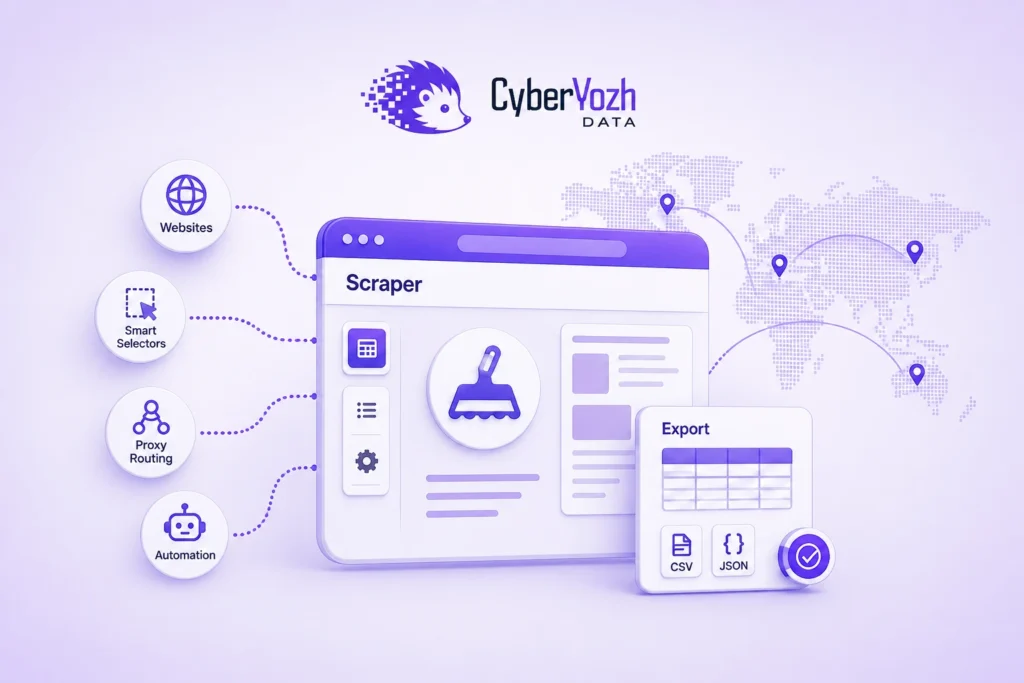
CyberYozh supports a broader web scraping workflow through its Data CyberYozh platform, open-source crawling and scraping tools, proxy infrastructure, geo-targeting, API access, and integrations with popular automation frameworks.
Instant Data Scraper helps you extract one page manually.
CyberYozh helps you build the infrastructure around a repeatable crawler.
What is Instant Data Scraper?
Instant Data Scraper is a browser extension that automatically detects repeating information on a webpage.
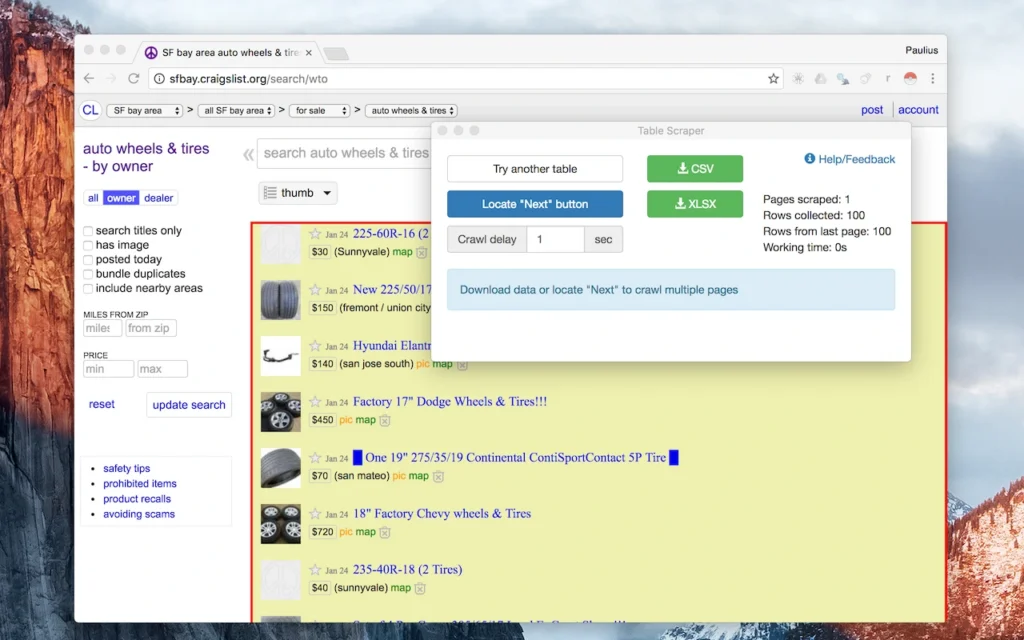
If a page contains twenty product cards with the same structure, the extension may identify fields such as:
- Product name
- Price
- Rating
- Product URL
- Image URL
- Availability
- Seller
- Category
It then places those fields into a table that can be exported as CSV or Excel.
The extension is most useful for:
- Public tables
- Ecommerce category pages
- Search results
- Business directories
- Event lists
- Job listings
- News indexes
- Property listings
- Product comparison pages
Its main advantage is that no coding is required.
You do not need to build a Python web scraper, configure CSS selectors, create a crawler queue, or connect to a database.
The trade-off is limited control.
Instant Data Scraper pricing: Is it free
People searching for Instant Data Scraper pricing usually want to know whether the extension requires a subscription.
Instant Data Scraper has historically been available as a free browser extension. However, users should confirm the current publisher, extension-store listing, permissions, privacy policy, update history, and support status before installing it.
Even when the extension itself is free, the complete workflow may not be.
The extension may be free, but repeated manual work still has a cost. Opening pages, repairing pagination, validating fields, and cleaning exports consume time. Recurring collection across many pages usually needs automation, monitoring, and reusable extraction logic.
When the Instant Data Scraper extension is useful
The extension is a good fit when the information is already visible, the layout is consistent, the dataset is small, and you need the data once. It is especially practical for public tables, simple directories, search results, and category pages that can be checked and cleaned manually.
It becomes less practical when the job must run regularly, pages rely heavily on JavaScript, results differ by country, sessions must remain logged in, pagination changes, or the output feeds a live product. Those requirements call for a crawler with retries, monitoring, storage, and controlled network routing.
At that stage, you need more than an extension.
Why CyberYozh is a better Instant Data Scraper alternative
CyberYozh is designed for teams moving from manual browser exports to automated, location-aware data collection. Its proxy infrastructure covers 195+ countries, supports API-based provisioning and rotation, and works with crawlers, browser automation tools, and antidetect browsers that accept HTTP or SOCKS5 credentials.
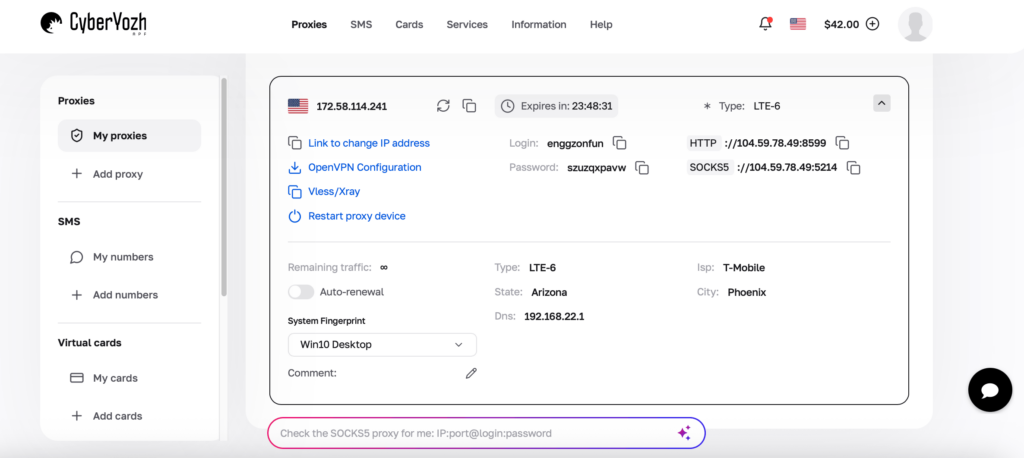
Residential proxy workflows can use automatic rotation or sticky sessions lasting up to 24 hours on supported configurations, helping teams preserve cookies, account state, and regional consistency across longer data-collection jobs.
1. CyberYozh supports repeatable web scraping
Instant Data Scraper usually requires a person to open a page, launch the extension, confirm the detected table, and export the file.
CyberYozh supports scraping frameworks and automation tools that can run on a schedule or as part of a larger data pipeline.
These include:
- Scrapy
- Playwright
- Puppeteer
- Selenium
- Python
- Postman
- Custom crawlers
If you are building a high-volume Python crawler, configuring a Scrapy proxy allows requests to use location-specific, rotating, or stable IP addresses without changing the core spider logic.
For JavaScript-heavy websites, a Playwright proxy can be applied at the browser or context level, while a Puppeteer proxy can separate browser workers across different connections.
Teams using Selenium can also add a Selenium proxy to run authorised browser tests from different locations or network environments.
2. CyberYozh supports regional data collection
A browser extension extracts what is already visible in your current browser session.
It does not automatically provide a reliable way to view data from another country.
This matters because websites may change:
- Product prices
- Inventory
- Search results
- Advertisements
- Delivery options
- Languages
- Currencies
- Promotions
- Local competitors
CyberYozh supports geo-targeted proxy infrastructure for regional data workflows.
Understanding what geo-targeting is helps teams distinguish between IP location, browser language, account country, cookies, and marketplace settings.
For example, an ecommerce company may need to compare product availability in Germany, Nigeria, the United States, and the United Kingdom. A properly configured regional crawler is more reliable than repeatedly changing browser settings manually.
3. CyberYozh offers several proxy types
There is no single proxy type that is best for every data project.
CyberYozh allows users to choose the network that matches the job.
Residential proxies
Residential proxies are useful when a project needs a large pool of ISP-associated IP addresses, regional coverage, or automatic rotation.
They may suit:
- Ecommerce monitoring
- Search-result collection
- Price research
- Regional data
- Market intelligence
- AI data collection
Datacenter proxies
Datacenter proxies are generally faster and more affordable.
They are useful for:
- Development
- Testing systems you control
- Accessible public websites
- API requests
- High-volume tasks where residential identity is unnecessary
Choosing between datacenter and residential proxies usually comes down to cost, speed, geographic requirements, and how strict the target website is.
ISP proxies
ISP proxies provide stable IP addresses associated with internet service providers.
They are useful when you need:
- Longer sessions
- Login continuity
- Cookies
- Multi-page workflows
- A consistent regional IP
Mobile proxies
Mobile proxies route traffic through LTE or 5G carrier networks.
They are best reserved for:
- Mobile application testing
- Mobile advertisements
- Social platforms
- Carrier-specific data
- Mobile-first services
Comparing mobile and residential proxies can help you avoid paying for mobile infrastructure when a residential connection is enough.
4. CyberYozh supports rotating and sticky sessions
Instant Data Scraper does not offer advanced proxy-session management as a central feature.
A scalable crawler may need:
- A new IP after every request
- One IP for a set period
- A stable IP for a login
- Separate sessions for multiple workers
- A specific country for each task
- API-controlled rotation
Rotation works well when requests are independent.
Examples include:
- Product pages
- Search results
- Public listings
- Category pages
- Price checks
Sticky sessions work better when a workflow depends on:
- Cookies
- Account logins
- Shopping carts
- Browser sessions
- Multi-step forms
Knowing how to rotate an IP address helps avoid changing the connection during a workflow that requires continuity.
The goal is not to rotate as often as possible.
The goal is to use the right session behavior for the task.
5. CyberYozh helps users evaluate IP quality
Proxy IP addresses can have usage histories.
An IP may have been connected to:
- Spam
- Fraud complaints
- Automated activity
- Blacklists
- High CAPTCHA rates
- Incorrect geolocation
- Previous account restrictions
CyberYozh includes risk and reputation tools that can help users evaluate an IP before assigning it to a data project.
A reputation check does not guarantee that every request will work.
It provides more information than choosing an unknown IP from a free proxy list.
6. CyberYozh works beyond one browser
Instant Data Scraper is built around a browser-extension workflow.
CyberYozh can support:
- Local scripts
- Servers
- Cloud workers
- Browser automation
- APIs
- Multiple credentials
- Data pipelines
- Distributed crawlers
- Team projects
This matters when the project becomes part of a real business operation.
A crawler can run on a schedule, store results automatically, report errors, and deliver structured data without waiting for a person to click an extension.
7. CyberYozh includes dedicated crawling and scraping tools
Data CyberYozh expands the platform beyond proxy routing with Yozh Crawler and Yozh Scraper for building repeatable, self-hosted data workflows.
Yozh Crawler can discover and traverse pages across a website, while Yozh Scraper turns selected content into structured JSON. The platform supports batch jobs, screenshots, authenticated sessions, live result streaming, self-healing selectors, marketplace presets, and HTTP API endpoints for integration with internal tools.
MCP connectivity also allows compatible AI agents to call scraping functions as part of an automated research or data-processing workflow.
Because the tools are open source and can be self-hosted, teams can control deployment, credentials, storage, and data handling instead of depending only on a browser extension.
Combined with CyberYozh residential, ISP, mobile, and datacenter proxies, this creates a fuller stack for ecommerce monitoring, market intelligence, SEO research, AI datasets, and other authorised collection projects.
Instant Data Scraper installation, app, mobile, and Firefox support
Before installing any scraping extension, confirm that the listing is official and current. Review the publisher, permissions, privacy policy, recent updates, and support website. Avoid repacked files, unofficial installers, and converted extensions shared through third-party channels.
Installation and browser permissions
Install Instant Data Scraper only through an official browser-extension marketplace. Because a scraping extension may read webpage content, use a separate browser profile for research and avoid running it on banking pages, payment dashboards, private customer systems, confidential email, or internal documents.
Desktop and mobile availability
Instant Data Scraper is primarily a desktop browser-extension workflow. Mobile browsers are suitable for reviewing pages, but scheduled or high-volume collection is better handled by a crawler, server, or API-based workflow.
Firefox support
Check the official Firefox Add-ons marketplace for a verified listing before installing a Firefox version. Do not install an unofficial conversion of a Chrome extension. When a verified version is unavailable, use a trusted alternative or run a crawler with Requests and Beautiful Soup, Scrapy, Selenium, or Playwright.
For recurring work, the browser should not define the architecture. A crawler gives you control over requests, selectors, retries, storage, scheduling, proxy settings, session duration, and data validation.
CyberYozh vs. Instant Data Scraper
| Feature | Instant Data Scraper | CyberYozh |
| Best for | One-time browser exports | Repeatable and scalable scraping |
| Coding required | No | Optional |
| Browser extension | Main workflow | Works with crawlers and antidetect browsers |
| Scheduling | Limited | Can be automated |
| Proxy management | Not a core feature | Residential, ISP, mobile and datacenter |
| Geo-targeting | Depends on browser connection | 195+ countries with regional routing |
| Sticky sessions | Limited | Up to 24 hours on supported residential plans |
| Automatic rotation | Not a central feature | Rotating residential proxies supported |
| API access | Limited | Proxy and workflow API access |
| IP reputation tools | Not a core feature | Available |
| Scrapy integration | No native integration | Supported |
| Playwright integration | No native integration | Supported |
| Selenium integration | No native integration | Supported |
| Large-scale jobs | Weak fit | Better fit |
| Team workflows | Limited | Suitable for multiple projects |
| Output | CSV or Excel | Depends on crawler, API or pipeline |
How to move from Instant Data Scraper to CyberYozh
Step 1: Define the fields
List the exact data you need.
For example:
- Product name
- Price
- Currency
- Availability
- URL
- Rating
- Collection date
Avoid collecting every field simply because it is visible.
Step 2: Test a small sample
Use Instant Data Scraper or a manual process to confirm that the data is useful.
Step 3: Choose the crawler
Use:
- Requests and Beautiful Soup for simple HTML
- Scrapy for larger crawling pipelines
- Playwright for JavaScript-heavy pages
- Selenium for browser automation
- A custom crawler when the workflow has unusual requirements
For a deeper implementation guide, see how to build a reliable Python web scraping workflow with timeouts, retries, validation, pagination, storage, and proxy support.
Step 4: Choose the network
Start with the least complex proxy that works.
- Datacenter for speed and lower costs
- Residential for regional public data
- ISP for stable sessions
- Mobile for carrier-specific tasks
The best proxy for web scraping depends on the website, location, session behaviour, request volume, and budget.
Step 5: Configure sessions
Decide whether each worker needs:
- Rotating IPs
- Sticky sessions
- Static IPs
- A specific country
- A specific ISP or carrier
- Separate credentials
Step 6: Automate storage
Move beyond manual downloads by sending data to:
- CSV
- JSON
- Google Sheets
- Databases
- Cloud storage
- Data warehouses
- Internal APIs
Step 7: Monitor results
Track:
- Pages attempted
- Pages completed
- Records collected
- Missing fields
- Duplicate records
- Timeouts
- Rate limits
- CAPTCHA responses
- Bandwidth
- Cost per usable record
A scraper is only successful when it produces accurate and useful data.
FAQs about the best Instant Data Scraper alternative
What is the best Instant Data Scraper alternative?
CyberYozh is a strong alternative for users who need repeatable crawlers, proxy infrastructure, geo-targeting, sticky sessions, IP rotation, API control, and integration with scraping tools.
Is Instant Data Scraper free?
It has historically been offered as a free browser extension. Confirm the current publisher, listing, permissions, pricing, and support status before installing it.
How much does Instant Data Scraper cost?
The extension may be free, but the manual work required to export, clean, validate, and repeat jobs creates an operational cost.
How do I install Instant Data Scraper?
Install it only from an official extension marketplace and review its current publisher, permissions, privacy policy, reviews, and update history.
Is CyberYozh a browser extension?
No. CyberYozh provides proxy, scraping, geo-targeting, credential, and automation infrastructure that works with crawlers, browsers, APIs, and scripts.
Final thoughts
Instant Data Scraper remains useful for quick, one-time exports from simple webpages and small datasets.
CyberYozh becomes the stronger alternative when collection must run repeatedly, cover multiple locations, maintain sessions, handle JavaScript, or feed a business system. The crawler controls extraction and delivery; CyberYozh supplies the regional routing, session control, API access, and proxy infrastructure.
Ready to build a repeatable workflow? Get started with Yozh Crawler, and Yozh Scraper, then choose the proxy type that matches your target location and session requirements.